Showing posts with label Ios. Show all posts

Wednesday, 16 March 2016

How to launch Apple Maps from iOS app


applemaps.png

Hi Readers!
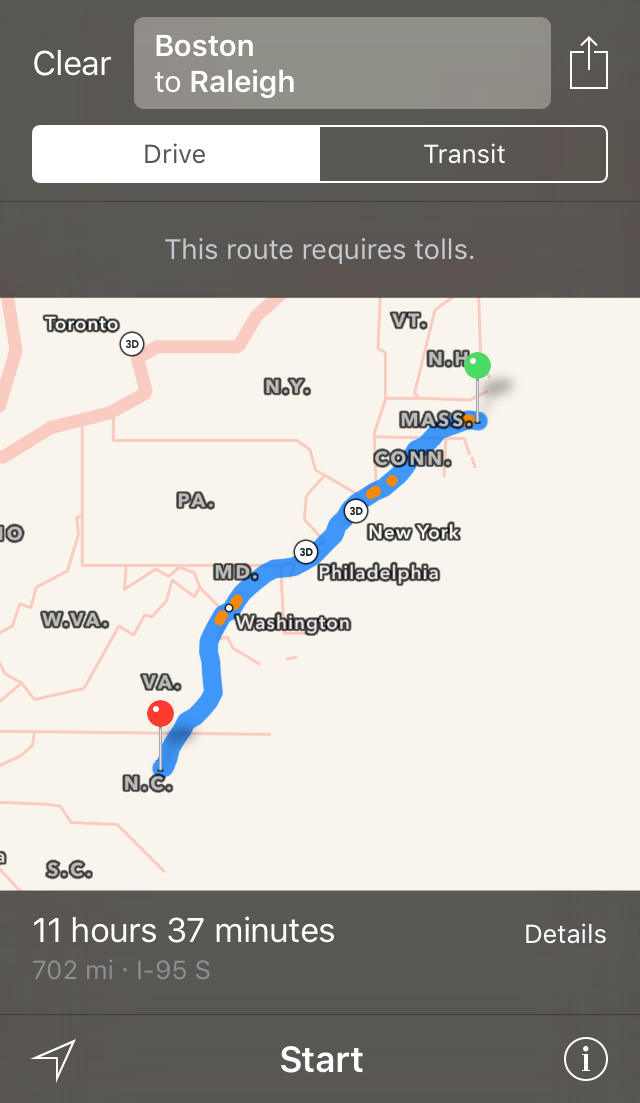
Below is the code to launch the Apple Maps application and display the directions between 2 points on Map.
Example 1: Display directions
  1. MKPlacemark *placemark = [[MKPlacemark alloc] initWithCoordinate:CLLocationCoordinate2DMake(42.313432,-71.057157) addressDictionary:nil];
  2.   MKMapItem *item = [[MKMapItem alloc] initWithPlacemark:placemark];
  3.   item.name = @"Boston";
  4.  
  5.   MKPlacemark *placemark1 = [[MKPlacemark alloc] initWithCoordinate:CLLocationCoordinate2DMake(35.843871,-78.645056) addressDictionary:nil];
  6.   MKMapItem *item1 = [[MKMapItem alloc] initWithPlacemark:placemark1];
  7.   item1.name = @"Raleigh";

Wednesday, 3 February 2016

ENABLE_BITCODE in xcode 7


bitcoin.jpg

Bitcode refers to an intermediate representation of a compiled program. The installation of iOS, tvOS, and watchOS apps by tailoring app delivery to the capabilities of the user’s particular device. Apple called this optimization,"app thinning". Note: Sliced apps are supported on devices running 9.0 and later; otherwise, the App Store delivers universal apps to customers. If you came across error like this:-
You must rebuild it with bitcode enabled (Xcode setting ENABLE_BITCODE), obtain an updated library from the vendor, or disable bitcode for this target. for architecture arm64 clang: error: linker command failed with exit code 1 (use -v to see invocation)

To view more about How to enable Bitcoin in Xcode-7 visit Findnerd.

Also visit Findnerd to read and post tech blogs and can also Ask tech Query over Findnerd.

Thursday, 14 January 2016

How to declare Sets in Swift


declare sets.jpg
Hi Readers!
Let us first understand what Sets means.
Sets
“A set stores unique values of same type in a collection with no ordering. Sets should be used when there is no defined order, such as in Array. Secondly Array can store multiple same values but Sets can't. Sets are distinct."
Hash Values for Set Types
Whatever type you take it should be hashable to be stored in a set. It means that the type must provide a way to compute a hash value. A hash value is an Int value so that same objects can be compared equally, such as if `a == b`, if follows that `a.hashValue == b.hashValue`.
All basic swift types (Int, String, Bool and Double) are hashable by default. Enumerations case values are also hashable by default.
Set Type Syntax
Swift Set is written as `Set` where `Element` is the type that the set will store.
Creating and Initializing an Empty Set
  1. var pets = Set<String>()
Here pets is set which can store String values
Creating a Set with values The example below creates a set called pets to Store String values:
Here is not the end…. To view the full blog about How to declare Sets in Swift visit Findnerd.

Also visir Findnerd for such more tech Blogs like Android,Java, Javascript,C,C++,Ios Development Blogs etc.

Monday, 21 December 2015

Change UIIMage background color in iOS


5Change UIIMage background color in iOS.jpg
Here is a function which returns an image with different background of you choice.
  1. - (UIImage* )setBackgroundImageByColor:(UIColor *)backgroundColor withFrame:(CGRect )rect{

  2. // tcv - temporary colored view
  3. UIView *tcv = [[UIView alloc] initWithFrame:rect];
  4. [tcv setBackgroundColor:backgroundColor];


  5. // set up a graphics context of button's size


Read full blog at our highly specific C, Java, PHP, Javascript, android, iOS developer forum about the topic described above "Change UIIMage background color in iOS". You can also learn much more about different programming technologies and can enhance your tech skills.

Thursday, 6 August 2015

How to add a Podfile in your Project

Below is the step-wise process for integrating a Podfile easily in your Application.
  1. Open Terminal
  2. Change the directory in Terminal to the location where your Xcode project resides.
  3. When you reach to the desired project location in which you want to add a PodFile. You can create an empty file by using the command “touch Podfile”.
  4. Then by using “open Podfile” command you can open the file you have created before and then add the desired podfile to that and close the window.
To read this full blog about Integrating a Podfile in a Project visit FindNerd.
FindNerd is a social platform for tech nerds to share knowledge by posting blogs, forums on web development along with job freelancing & project management feature.

Wednesday, 29 July 2015

Send Push Notification with Custom Data to iPhone device from Java Server Side

This blog will help you to send Push Notifications with Custom data to iPhone devices from server side where server side code is written in Java.
Follow the below code in order to send Push Notification:
  1. Define the below dependency in your pom.xml, if you are using maven:
<dependency>    <groupId>com.github.fernandospr</groupId>    <artifactId>javapns-jdk16</artifactId>    <version>2.2.1</version></dependency>
Otherwise, put the JavaPNS_2.2.jar into your lib folder of your project.
  1. Send Push Notification with Custom Data to iphone device:
Write the following metthod to send Pust Notification with Custom Data to iphone devices:
FindNerd, known for its quick response time, when people ask questions on various platforms, as it is a good resource of Android, C, iPhone, Javascript, HTML, Java Questions & Answers, etc.


Monday, 22 June 2015

UIImage Cropping in Objc

Sometimes we click picture from ios camera but it does not return us the same image as appears inside the camera frame. Use below function to get an image of exact size which was visible through camera.
Follow these Steps:-
Step 1. First of all set the captured image to an UIImageView.
Step 2. Pass that camera uiview to below function so that we can get visible frame of opened camera view.
Step 3. Also pass the UIImage (captured photo) as a param to below function.
To Read complete information about “UIImage Cropping in Objc” visit FindNerd. As it is an effective technology forum, so here you can also ask questions & look for various programming queries along with their solutions including Android, C, Java, php programming questions and answers etc.

Monday, 15 June 2015

How to set Camera view aspect ratio in iOS

Sometimes we face problem with Camera view aspect ratio in ios. Solution to this problem is here.. Set its aspect ratio property to AVLayerVideoGravityResizeAspectFill. It actually preserve aspect ratio; fill layer bounds.
  1. AVLayerVideoGravityResizeAspectFill may be used when setting the videoGravity
  2. property of an AVPlayerLayer or AVCaptureVideoPreviewLayer instance.
For full blog of  “How to set Camera view aspect ratio in iOS” visit FindNerd & for more iPhone blogs visit our iPhone development blogs section.
You can also ask questions & look for various programming queries along with their solutions including Android, C, Java, php programming questions and answers etc. as it is an effective technology forum also.

Friday, 12 June 2015

Make UIImage White Background Transparent in iOS

If you came across to a requirement where you want to make UIImage Background Transparent then use below method to achieve it.
  1. +(UIImage *)changeWhiteColorTransparent: (UIImage *)image{
  2. CGImageRef rawImageRef=image.CGImage;
  3. const CGFloat colorMasking[6] = {222, 255, 222, 255, 222, 255};
To Read complete information about “Make UIImage White Background Transparent in iOS” visit FindNerd. Apart from this, you can also ask questions & look for various programming queries along with their solutions including Android, C, Java, Php programming questions and answers etc. as it is an effective technology forum also.

Friday, 15 May 2015

Autoplay media files in UIWebView in IOS

When displaying media content using HTML5 in a web view on IOS the autoplay functionality does not work.
To enable to web view to autoplay the media (if coded in HTML to autoplay) you need to add a line of code in your IOS application as explained.
Let's say you have a webview object declared as in line below.
  1. UIWebView *videoView;
Then you need to add the code after initializing the webview as below.
  1. videoView.mediaPlaybackRequiresUserAction = NO;
  2. videoView.allowsInlineMediaPlayback = YES
This forces the video/audio to autoplay in UIWebView if directed in HTML code.

For such more Blogs you can visit to http://findnerd.com/NerdDigest

Friday, 8 May 2015

How to get sub strings from a string using Regular Expression

Hi, The below code is to get sub-strings from a string. You are going to love this below code which is very simple but very effective. I have used regular expression to get the sub strings.
  1. NSString *strTest = @"Hii how are you doing @Ravi , how do u do @Kiran where are you @Varun";
  2. NSError *error;
  3. NSRegularExpression *exp =[NSRegularExpression regularExpressionWithPattern:@"@[^ ]*" options:NSRegularExpressionCaseInsensitive error:&error];
  4. NSArray *s1= [exp matchesInString:strTest options:NSMatchingReportCompletion range:NSMakeRange(0, [strTest length]) ];
  5. [s1 enumerateObjectsUsingBlock:^(id obj, NSUInteger idx, BOOL *stop) {
  6. NSTextCheckingResult *result = obj;
  7. NSString *str = [strTest substringWithRange:result.range];
  8. NSLog(@"str %@",str);
  9. }];

For such more Blogs you can visit to http://findnerd.com/NerdDigest